Make informed decisions with the Integrative Conservation Clinic
April, 2023 | School Project - Wilfrid Laurier University
Project Type: Group
Role: analyzed user research, developed prototypes, analyzing user tests
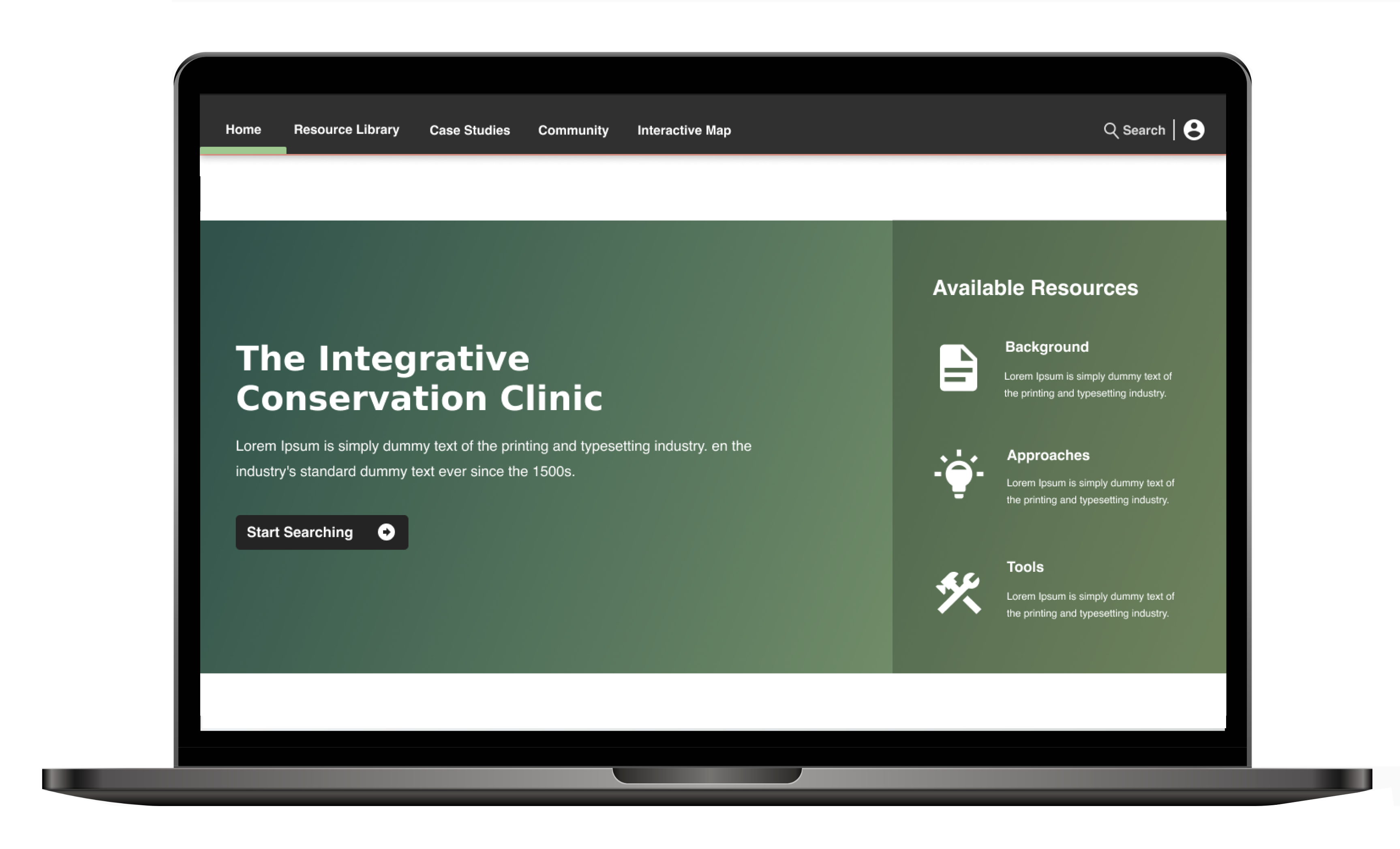
The Integrative Clinic is a one-stop shop for all things conservation. Users can search for location-specific resources, watch tutorials, create and contribute to discussion posts, report outdated content, and more.
Project Brief
The Integrative Conservation Clinic represents a pioneering effort spearheaded by William & Mary University. Its primary objective is to establish a cutting-edge digital database tailored to the specific requirements of ecological conservationists in their daily endeavours. As a pivotal component of our concluding capstone project, my team and I embarked on an 8-month comprehensive journey through the five-step design thinking process: emphasizing, defining, ideating, prototyping, and testing. Our mission was to craft a platform that would cater to the unique needs of our target users (ecological practitioners).
Software Used
Figma
Zoom
Research and Discovery
Competitive Analysis
Starting this project, we analyzed 5 conservation websites to understand the competition landscape. Our research revealed that most of these sites needed a modern update, but they offered valuable functional ideas. These websites allowed users to filter search results and had straightforward navigation, though they lacked visual elements, relying heavily on text. Our goal through this research was to identify areas for improvement and create a more user-friendly solution.
The sites we analyzed include Wild Labs, Bon in a Box, U.S. Climate Resilience Toolkit, Conservation Standard, and Panorama Solutions. Here's a brief overview of each site:
Advantage: The time of the most recent comment on any given post is displayed for each thread, indicating thread activity allows users to see what discussions are on the rise
Disadvantage: Lack of filters, confusing and limited ability to connect with other users, Doesn't link threads to existing research
Bon in a box
Information/Resources Available: The latest biodiversity observation design, data collection protocols, and data management, analysis and reporting tools
Advantage: Highly navigable due to a simple 3-category system, it's a prime source for search feature inspiration with its robust filtering
Disadvantage: Only one of the categories, the tools category, was even remotely indicative of a place that could house information
U.S. Climate Resilience Toolkit
Information/Resources Available: Features guidance, tools and resources for planners and general public to help understand the impact of climate change in their communities
Advantage: The region tab was a different way of searching for information that we have not seen anywhere else
Disadvantage: Redundancy in content and initial search confusion, the many ways to navigate the site may induce a feeling of information overload
Conservation Standard
Information/Resources Available: A home site that branches off into three different websites, each of the three websites tackles a separate aspect of the organization's core mission: creating partnerships between conservation organizations
Advantage: An intuitive naming scheme to break down the information housed on the site
Disadvantage: None recorded upon initial analysis of site
Panorama solutions
Information/Resources Available: Structured as a collection of information spanning various topics: Conservation, Finance, Governance, World Heritage
Advantage: Unique search opportunities
Disadvantage: None reported upon initial analysis
User Interviews
During our generative research, we conducted 6 semi-structured interviews. Through our interviews, we wanted to identify our user's tasks, any frustrations they may experience as they complete them, and the tools they use. All interviewees were from our desired target group (practitioners). The interviewees had varying job titles, such as conservation and forestry technicians, and all of these participants were from North America. During these interviews, we asked our interviewees 15 questions focusing on their goals, daily tasks, frustrations, forms of communication, used resources/tools, and information needs. Follow-up questions were also asked to allow for further insight.
User Surveys
The client provided us with the results of their previous surveys. There were 128 participants. Not all of the user responses were from the desired user group. Therefore, this information was only used to reinforce the data collected during our interviews.
Key Insights
We discovered that practitioners require a single, reliable information source. Many practitioners stated they utilize multiple platforms and databases, including private ones, guidebooks, podcasts, and peer discussions, to access necessary data. However, challenges arise due to the limited online data availability for specific species and regions, as one interviewee noted that "oftentimes there is no research recorded on elephants in Asia, so we rely on the data from Africa." This issue causes practitioners to rely on less familiar and occasionally unreliable sources.
In the field, accessing region-specific data is vital for informed decision-making. However, professionals often encounter challenges when searching for such information. Current solutions include tools like Panorama Solutions, which offer region-specific data, keyword searches, and consultations with conservation authorities. Interviewee #1 noted that they “look for information in their region, ecosystem, and on similar species to the ones they are working with” to inform their decisions.
Efficient communication and information exchange are crucial for conservation progress. Current solutions encompass mainstream social media platforms like Twitter, Instagram, and email, as well as specialized tools such as Miradi Share, SalesForce, and LinkedIn. Challenges arise as some organizations withhold research, impeding collaboration. Interviewee #3 emphasized the value of information sharing, noting that it prevents mistakes from reoccurring when working on shared projects. Connecting and sharing insights among conservation professionals fosters collective learning and more effective conservation endeavours.
Information legitimacy and credibility are critical to conservation practitioners. Conservationists heavily rely on research from various sources, such as case studies and reports, to guide their efforts. However, online information can be disorganized and sometimes unreliable, leading to inaccurate conservation strategies and wasted resources. Users also expressed the desire for all resources and information to be in one place to reduce wasted time browsing for different sources. By ensuring that data is both trustworthy and reliable, conservation practitioners can increase the likelihood of implementing successful conservation strategies.
Personas and Journey Maps
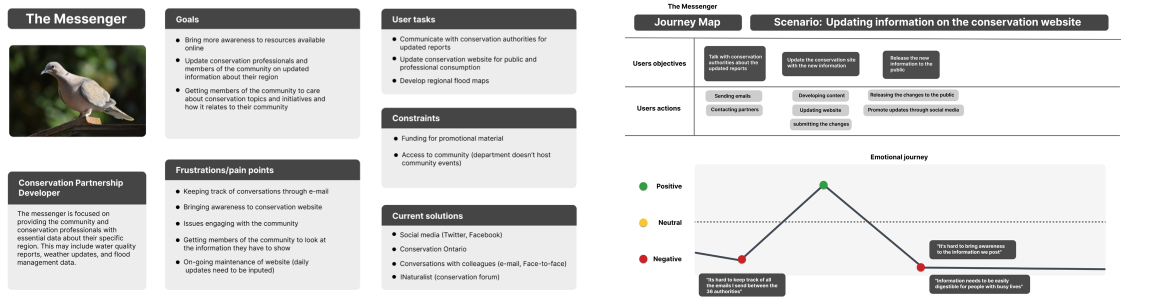
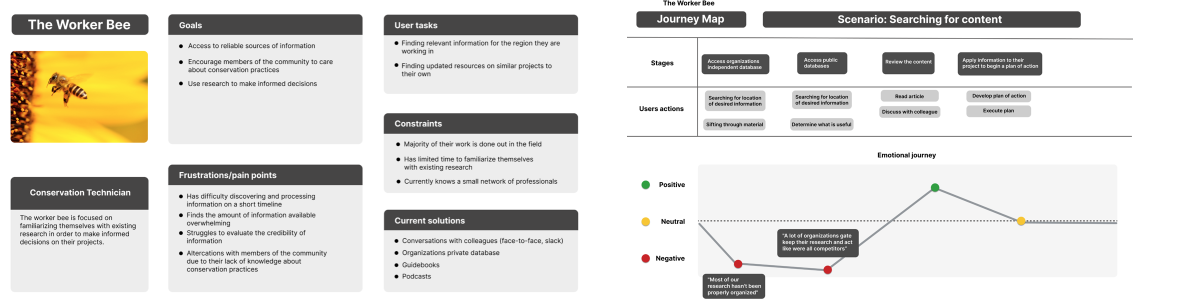
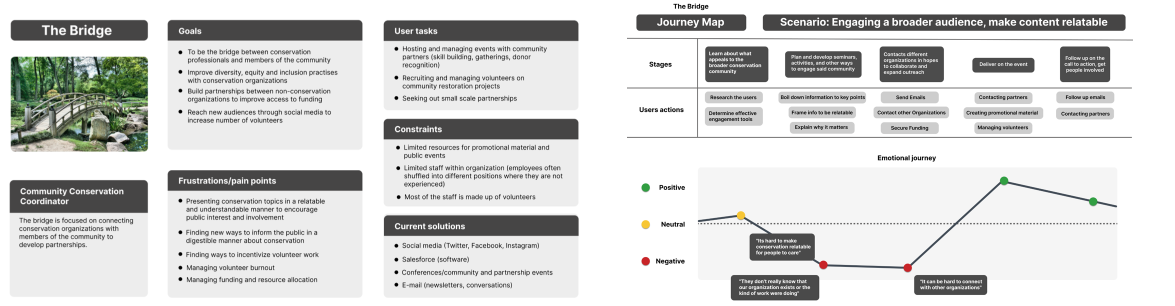
With the help of an affinity map to organize the myriad of insights gathered during our user interviews, we crafted three distinct personas and correlated journey maps. These essential artifacts served as constant touchstones throughout the project, guiding us in maintaining a clear focus on the intended users for our design.
Fig.1 The Messenger persona and journey mapFig.2 The Worker Bee persona and journey mapFig.3 The Bridge persona and journey map
Problem Definition
The central issue our users confronted revolved around the need for a more streamlined approach to researching existing resources. Many users found themselves using multiple platforms to satisfy their informational requirements, often encountering limitations in the quality and reliability of accessible information. Furthermore, we uncovered that our users often depended on external feedback from their colleagues during their research endeavours.
Through our competitive analysis, we discovered a common issue in existing platforms – a lack of features for users to connect and communicate with each other.
Design Process
Design Goals
Our design is derived from the original vision of the Integrative Conservation Clinic, as talked about previously. This design aims to provide a platform for conservationists to find many information artifacts to assist them with their information needs. Our overarching design goals can constantly remind us of what we are trying to achieve with our solution.
Access to a reliable, credible, and up-to-date database of information that evolves as new findings are discovered
Reliability & Credibility: we want to ensure users that all information held within the database is accurate and supported by industry professionals
Articles should be easily updatable
Encouraging community members and other partners to collaborate in sharing their findings
Discussions will allow practitioners to communicate with others in the field
Sharing opinions and discussing experiences was outlined to be helpful in the eyes of some users
Connecting with other professionals in pursuit of understanding different research practices
Providing practitioners with an intuitive way to search for information
Location-based searching to assist users who are not entirely sure about the information they need
Filtering, keywords, and categories will help narrow down search results for any depth of search
Providing multiple ways of consuming information for users who want to spend less time on the platform
Video tutorials for quick and engaging solutions to tasks users do not want to invest a lot of time into
Curated summaries so information can be more easily identified
Prototyping and Testing
Testing Methods
For this project, 3 phases of tests were conducted with our target group (practitioners) and client-provided testers. I was responsible for developing each version of the prototype on Figma for this process. These tests were conducted remotely over Zoom. In our first round of usability testing, one of the team members shared their screen with the participant and encouraged them to direct the team member to a specific menu option or page to complete the tasks. In our second and third rounds of testing, we had the participant share their screen and interact with the prototype themselves.
The Think Aloud Protocol was our primary method of gathering information from our participants, as it was important to hear their thought processes when navigating our solution. A designated note-taker recorded observations, and each session was recorded and further analyzed to uncover further insights about our design. By converting the raw data into meaningful information, we could establish user mental models and modify the prototype appropriately.
Goals for Usability Test
Usability: users experience 2 or fewer errors while completing tasks
Learnability: do the users understand how to navigate the system
Task completion: can users complete the tasks
Usability Tasks
We composed 3 different tasks for users to complete for our usability test. These tasks focused on our interactive map, discussions, and structure of our report page. The success of each task was broken down into 3 evaluation categories: pass, indirect, and fail. Through this evaluation, we determined the viability of our current design. Upon completing our tasks, participants would be asked follow-up questions based on their comments during the test to help gain further insight. Each identified usability issue was then evaluated based on its severity (the level of distribution to the completion of the task) and the frequency of the error (the total number of times the error occurred during this phase).
Participants
For our user tests, we comprised a group of 5 individuals who were fortunately able to return for each phase of testing. Most of these testers were in ecological conservation, although not all were specifically practitioners. Most testers were from the United States.
Low-fi Prototype
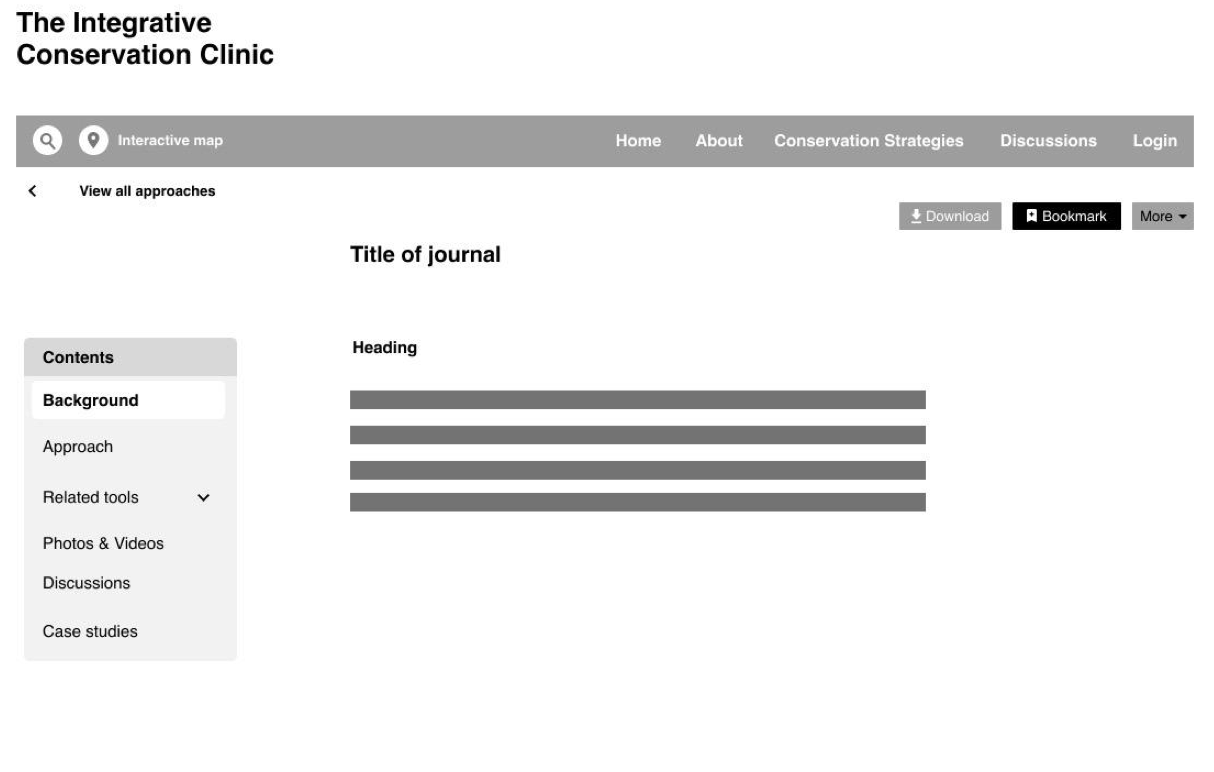
As this prototype was not interactive, a wizard test was employed to help simulate the functionality of our platform. Participants verbalized where they would click on the prototype to work through one of the presented tasks. A group member would then simulate the prototype's response to each action. During this stage, we were able to acquire 6 different testers.
Fig.4 Low-fi prototype
Mid-fi Prototype
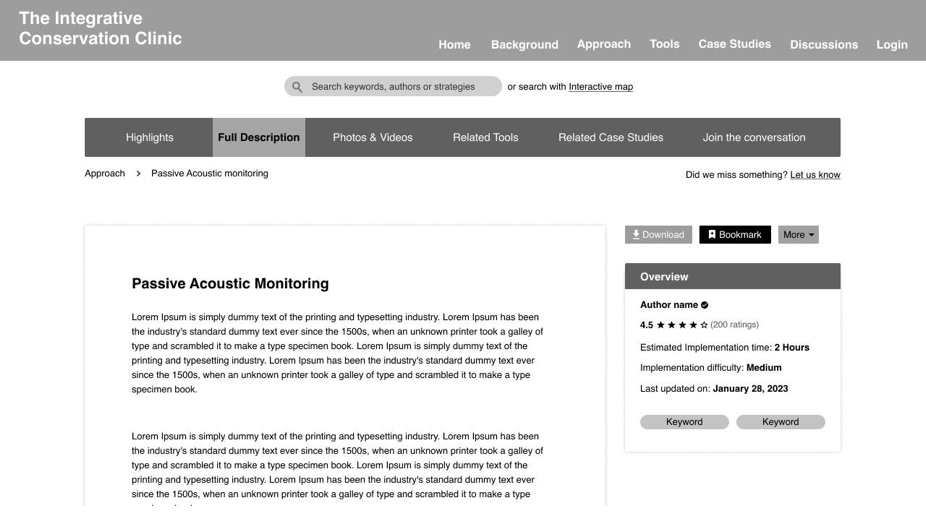
During the second phase of testing on our mid-fi prototype, we introduced an additional 2 tasks focusing on our bookmarking and update requesting functionality. Interactive elements were also introduced into this prototype. We were able to conduct a total of 5 tests. All of the testers for this phase returned from the initial series of tests on the low-fi prototype.
Fig.5 Mid-fi Prototype
High-fi Prototype
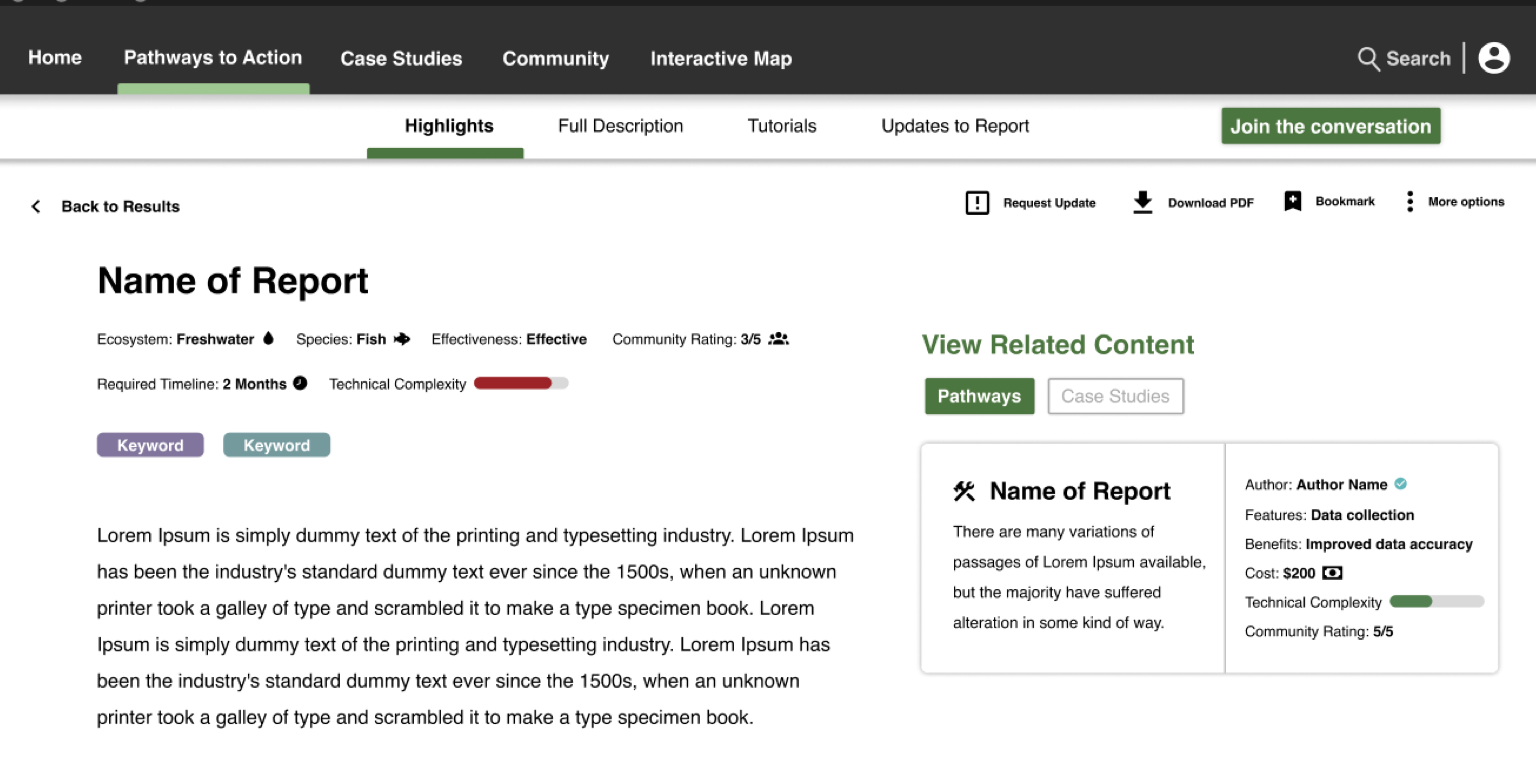
After our second round of testing, we developed an initial high-fi prototype. Going into the final stages of this project, we wanted to test the prototype further to understand how well our users could complete tasks within it. Tasks were also modified for this prototype. For this test, we continued tracking task success and think-aloud. We also began tracking the number of clicks to provide us with more insight into which of our tasks may take more effort to succeed. Once again, we recruited participants we had tested from the previous phases. For this final phase, we conducted a total of 3 user tests.
Fig.6 High-fi Prototype
Key Findings and Refinements
Upon analyzing the insights gathered from all the usability tests, primarily the final usability test, we understood the required areas of improvement. Navigation titles were altered to help users better understand their intended purpose. Through the think-aloud process, we learned that many of our participants didn’t find value in including reports on strategies within the interactive map. The participants stated they would primarily use the map to discover location-based case studies. A feature that was well-received by the participants was the interactive map. Many participants appreciated the inclusion of a location-based search through the interactive map.
The majority of the participants also liked the idea of being able to categorize the bookmarked content into custom folders, as they believed it would help them more easily retrieve content. Through our second phase of usability tests, we discovered issues with the information architecture and separation of content through backgrounds, approaches, and tools. Within this prototype, we modified the architecture to house all the respective content within a single section of the site. Lastly, in our final tests, we discovered that users had an easier time understanding how to find content when presented with the newly updated results page.
Final Prototype
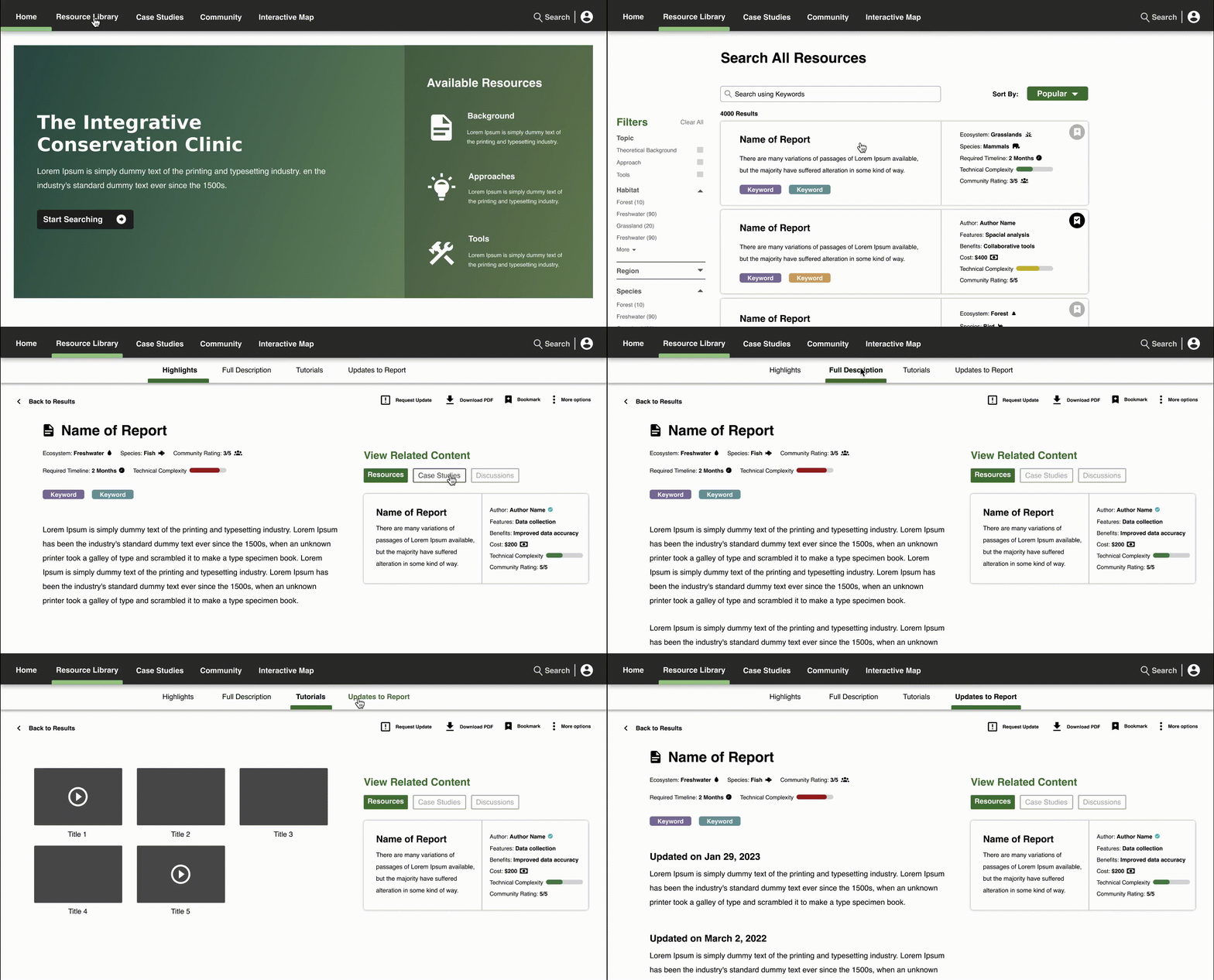
Upon opening our platform, users can begin to search for content. When selected, the resource library tab will bring users to a search page where they can type keywords, filter results or view the latest content added to the site. Once an article is selected, the user can view related content, view in-depth or summarized explanations of the report, watch tutorials, bookmark, report an issue, or view the latest updates to the article.
Fig.7 Search task flow
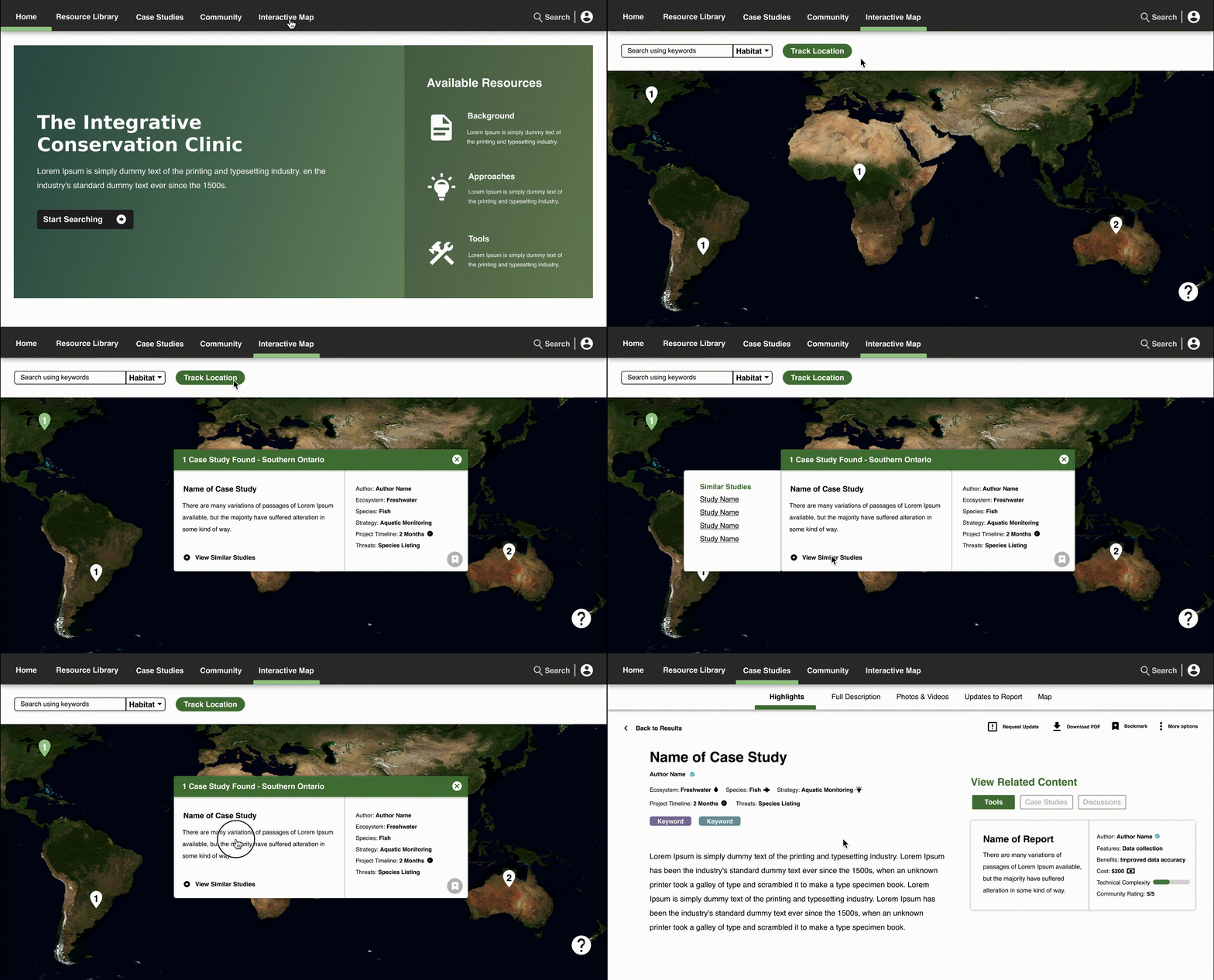
Upon opening our platform, users can access our interactive map. Within the interactive map, users can search for specific topics, track their location or click on the map to locate region-specific articles. Each article result will display related content.
Fig.8 Interactive map task flow
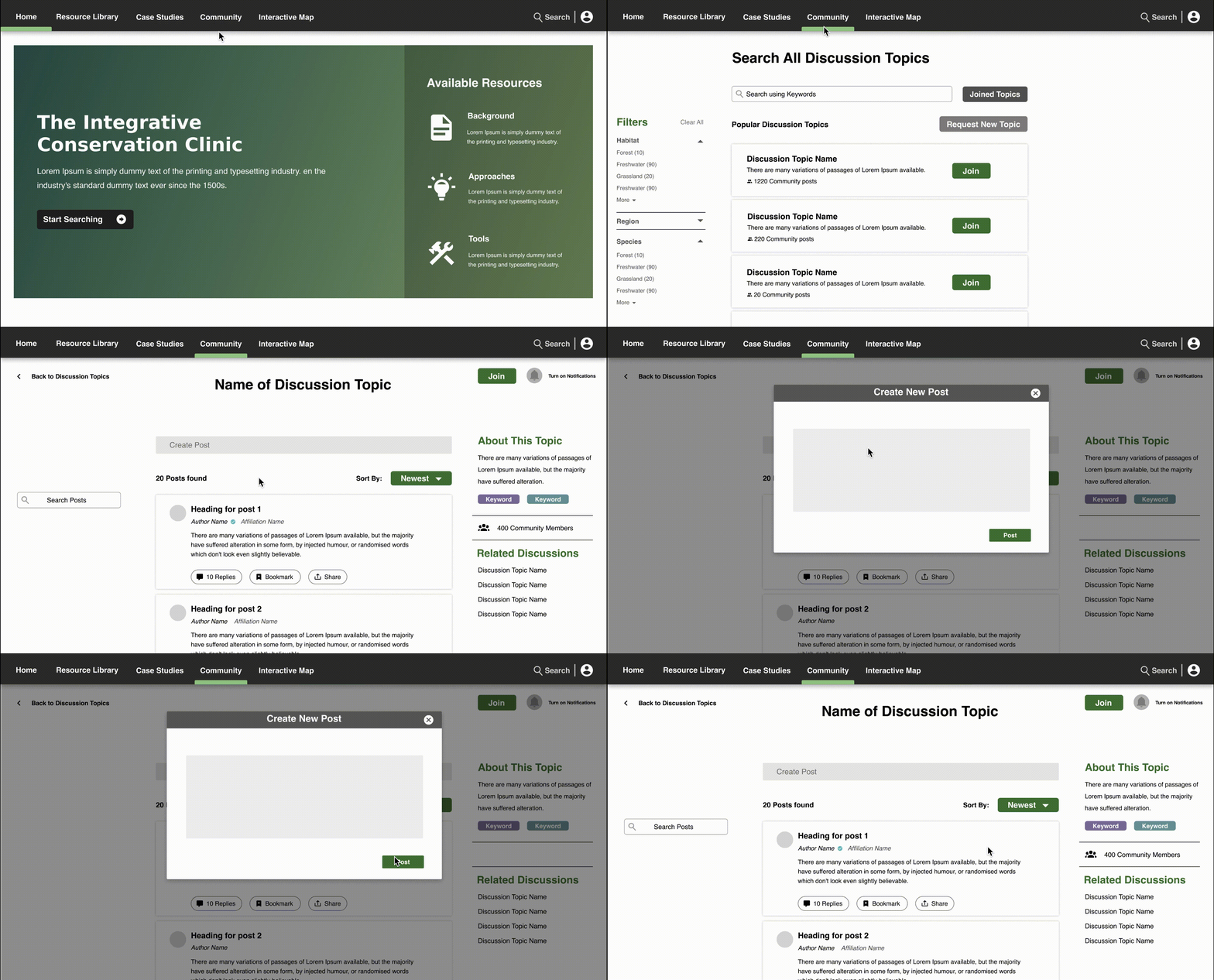
Upon opening our platform, users can access the community tab in the main navigation. From the community page, users can explore various discussion topics. Once selected, users can join threads, create posts or interact with existing posts.
Fig.9 Discussion task flow
Future Iterations
Some features that the client may be interested in pursuing at later stages of this project include a mobile companion app to allow users to access their bookmarked conversations, case studies, and reports. Including the ability for verified users to add meta tags to content is also beneficial as it helps to improve the search and retrieval process for others using the site. Enabling users to share entire bookmark folders will also help to reduce time spend sharing individual reports or case studies.
Reflection
One of the main challenges my team and I faced with this project was recruiting users to interview and test our prototypes. Conservation practitioners are often out in the field, causing difficulty in keeping a consistent and open dialogue with them. To help us overcome this, we began testing our prototype with users who did not necessarily fit the description of a conservation practitioner but were educated on conservation and were associated with our client and the project.
Another key challenge we faced was labelling our main navigation on the platform. When our client initially presented this project, they were adamant about separating the information housed on the site by approaches, tools and background. However, we discovered users didn't understand what these titles represented. Developing new titles was also challenging due to our lack of knowledge in the field of conservation itself. We heavily relied on discussions with our client and user testing.
Conclusion
Our information retrieval database platform allows users to find relevant and updated information on conservation topics. Through the platform, users can read various reports, review suggested content, learn more about authors, interact with our interactive map to discover local studies, watch tutorials on tools and approaches, rate, bookmark, or download content, connect with other practitioners through discussion forums to discuss relevant topics, make requests to updated information on the site, and publish some of their findings.