Experience concerts from the comfort of your own home with Venue
March, 2018 | School Project - Humber College
Project Type: Group
Role: User interviews, developing initial sketches and final prototype
Venue is a concert application that allows music lovers to see their favourite artists live at home. Users can view live or archived concerts in both audio and video formats, create playlists and follow friends. Save money on tickets and re-live your favourite concerts.
Project Brief
Concerts can be expensive in this day and age. Tickets often average from $80-$200. Sometimes, the only alternative is to find uploaded clips of the show on YouTube. But more than often, the video quality is poor, and songs are left out. My group wanted to develop an application to help bring the concert experience to our users' homes for a fraction of the cost. With Venue, fans will no longer miss out on once-in-a-lifetime experiences with their favourite artists.
The project's main focus was to develop an application that would provide users with easily accessible media. Another main focus was on the development of the UI.
Software Used
Adobe Illustrator
Adobe Photoshop
XCode
Research and Discovery
Competitive Analysis
As we started this project, we analyzed 3 streaming platforms to understand the existing competition. Our research revealed that all these platforms presented users with a modern, easy-to-navigate experience. Users could filter search results, create playlists, follow their favourite creators, and leave comments. While YouTube encouraged users to upload their content to the site, Apple Music and Spotify did not. YouTube had also begun introducing VR capabilities for select videos at this time. All platforms relied heavily on visual elements. Our goal through this research was to identify key features or functions of each application.
Apple Music
Main Function:A music streaming platform
Advantage:Apple Music is an easy-to-navigate application that pushes popular and new music to its user base. User can easily keep up to date with their favourite artist's latest releases, listen to live broadcasted radio shows, view exclusive releases on the platform, and create playlists.
Disadvantage:Users can't upload their content directly to the platform; a third-party website is needed. Though the site does feature music videos, it lacks any other video content. As Apple Music is primarily used on Apple products, Android users may be unaware that the application is also available on the Google Play Store. Apple Music also does not provide a free version of their service.
Spotify
Main Function:A music streaming platform
Advantage:Spotify offers its users a free version of their service, the app features podcasts, and takes a friend-centric approach within its application, encouraging users to connect with friends and share each other’s activity. The app features exclusive content. The application also pushes its suggested content based on the user's listening history.
Disadvantage: As Spotify solely features audio content, users are required to visit a third-party site to view music videos or live content. The availability of songs and features can vary depending on a user’s region. Non-paying user's listening experience is often interrupted by ads.
YouTube
Main Function:Video streaming platform
Advantage:YouTube provides its users with a vast and diverse library of videos covering virtually every topic imaginable. YouTube is a primarily free platform. Users can generate content. The platform provides a robust search engine that makes it easy to find specific content. The site features live content. Their recommendation algorithm suggests relevant content to viewers.
Disadvantage:The application features intrusive ads for non-paying users. Because anyone can upload videos, the quality of content varies, and the application has limited offline support for users.
User Interviews
At the beginning of this project, we convened a focus group of 5 individuals. This group consisted of mostly concertgoers. This session served as a valuable opportunity to delve deeply into their insights and explore a wide range of perspectives. Specifically, we explored what attracted these individuals to attend shows and what factors deterred them. We also explored the different alternatives these individuals employed to fulfill their concert-related desires without physically attending concerts and the associated challenges they encountered.
Key Insights
When designing a concert streaming application, there are a few things to consider. Concerts are perceived as once-in-a-lifetime opportunities to witness your favourite artists perform their latest songs, creating a sense of urgency due to their limited availability. By allowing users to watch archived concerts, we aim to alleviate the pressure associated with attending in person. It will also allow users who did attend a show to re-experience it. A big part of the concert experience is the ability to communicate with those around you. One participant stated, "Being able to interact with others makes the entire experience so magical." Including a comment section during live concerts can help build a sense of community within our application.
The primary source used to view concerts at home was YouTube. One of the more common issues our users found when finding concerts on this platform was the poor video quality due to videos being recorded on cellphones. Show videos were also often incomplete or uploaded in multiple videos. This process can be frustrating and time-consuming for a user. By providing our users with professionally recorded shows, we can help resolve some of these frustrations.
Design Process
Ideation
As we began our initial ideation phase, we developed an affinity diagram to help us brainstorm possible features and ideas for this application. We meticulously grouped and colour-coded related concepts.
Design Goals
Audio & Video only content
Users can choose between audio and video content based on their preferences. They can listen to audio while multitasking or commuting and watch videos when they can focus on the visuals.
Personalization
By allowing users to follow their favourite artists or create their own playlists, users will be able to tailor their own experience with the content provided
VR
By including VR capabilities users will have a more immersive experience
Community building
Creating a sense of community among users by allowing users to follow artists, interact with fellow fans, and follow friends.
Sketches
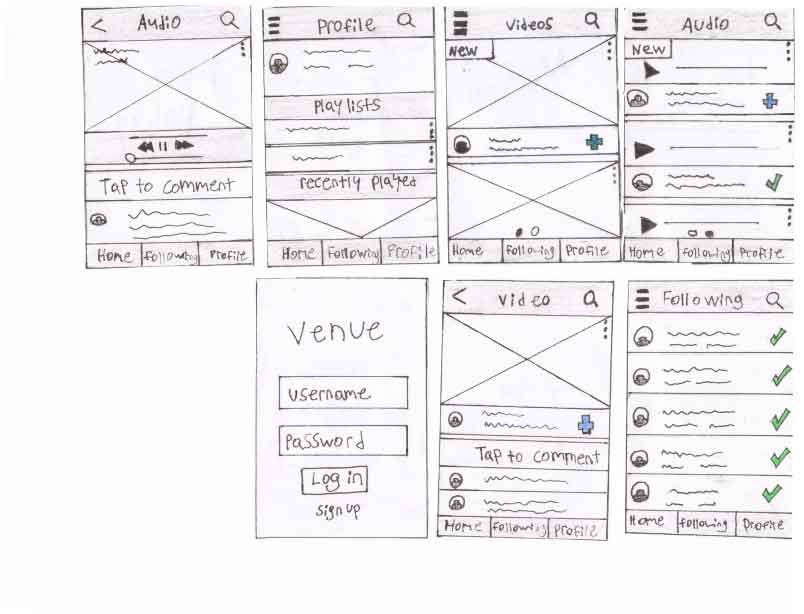
As we began drawing our initial sketches, we embarked on the first steps of translating our ideas into visual form.
Fig.1 Sketches of prototype
Prototyping and User Testing
Testing Methods
For this project, 2 phases of user tests were conducted with users. I was responsible for developing the final prototype. These tests were conducted in person. In our first round of usability testing, one of our team members would present our participants with a paper prototype of our design and encourage them to direct the team member to a specific menu option or page to complete the tasks. In our second round of testing, we would present our prototype on a laptop and allow users to explore the design on their own.
The Think Aloud Protocol was our primary method of gathering information from our participants, as it was important for us to hear their thought processes when navigating our solution. A designated note-taker recorded observations and further analyzed the results to uncover further insights about our design. By converting the raw data into meaningful information, we could establish user mental models and modify the prototype appropriately.
Goals for Usability Test
Usability: users experience 2 or fewer errors while completing tasks
Learnability: do the users understand how to navigate the system
Task completion: can users complete the tasks
Participants
For this project, our participants were primarily classmates. 6 participants were used for the first stage of testing, and 4 were used for the second.
Usability Tasks
We composed a series of tasks for users to complete for our usability test. These tasks focused on some of the main functions of our streaming application. Some of these tasks included creating a playlist, switching to audio content, searching for a concert.
The success of each task was broken down into 3 evaluation categories: pass, indirect, and fail. Through this evaluation, we determined the viability of our current design. Upon completing our tasks, participants would be asked follow-up questions based on their comments during the test to help gain further insight. Each identified usability issue was then evaluated based on its severity (the level of distribution to the completion of the task) and the frequency of the error (the total number of times the error occurred during this phase).
Low-fi Prototype
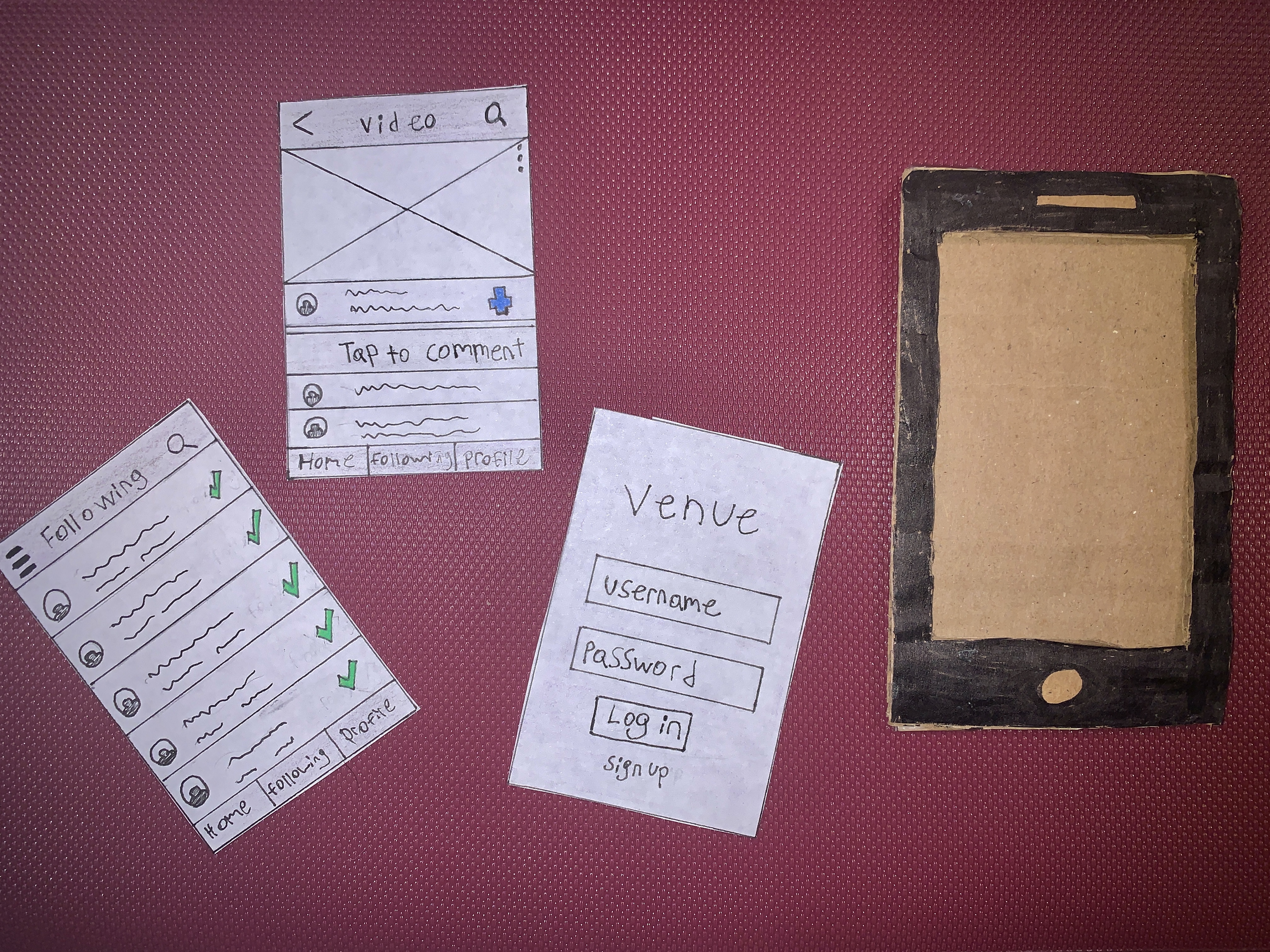
Our initial usability test was conducted with the sketches of our prototype. As this prototype was not interactive, a wizard test was performed to help simulate the functionality of our streaming application. Participants would point to where they would click on the sketch to complete one of the presented tasks, and a group member would simulate the prototype's response to each action.
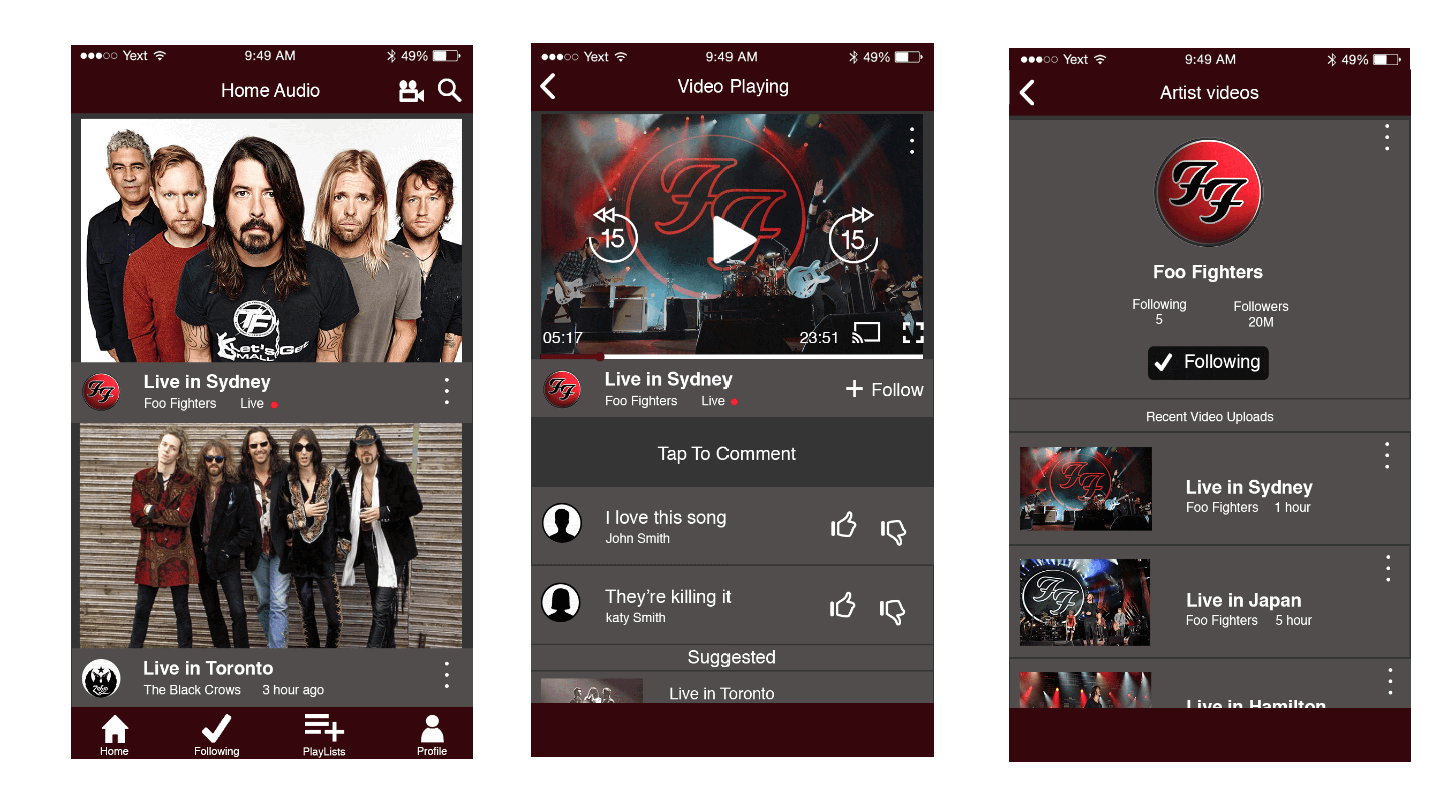
Fig.2 Low-fi prototype
Mid-fi Prototype
During the second test, we introduced an additional task that focused on following artist accounts. Participants were once again evaluated based on their task success and think-aloud protocol. The wizard test was conducted for this test as interactive elements were not present at this stage. The high-level goals also stayed the same during this test. 4 participants in total were tested. The mid-fi prototype was developed on Adobe Illustrator.
Fig.3 Mid-fi prototype
Key Findings and Refinements
Upon analyzing the insights gathered from all the usability tests, primarily our final test, we were able to develop a clear picture of the areas of improvement needed for our design. One of the main issues we discovered was the transition between audio and video content. In both initial prototypes, we placed an icon at the top right corner of our app. This button allowed users to switch the content format. Most users stated that the icon was easily missed. To resolve this, we placed prominent icons within the main navigation bar to prevent it from being easily missed. Another challenge we encountered was related to the hamburger menu, as users frequently overlooked it when navigating the prototype. As a result, several features went unnoticed or underutilized. To resolve this, we developed a main navigation bar at the bottom of the app. Some users expressed issues with the overall aesthetic of the application. The application also presented little room for lack of error prevention.
Final Prototype
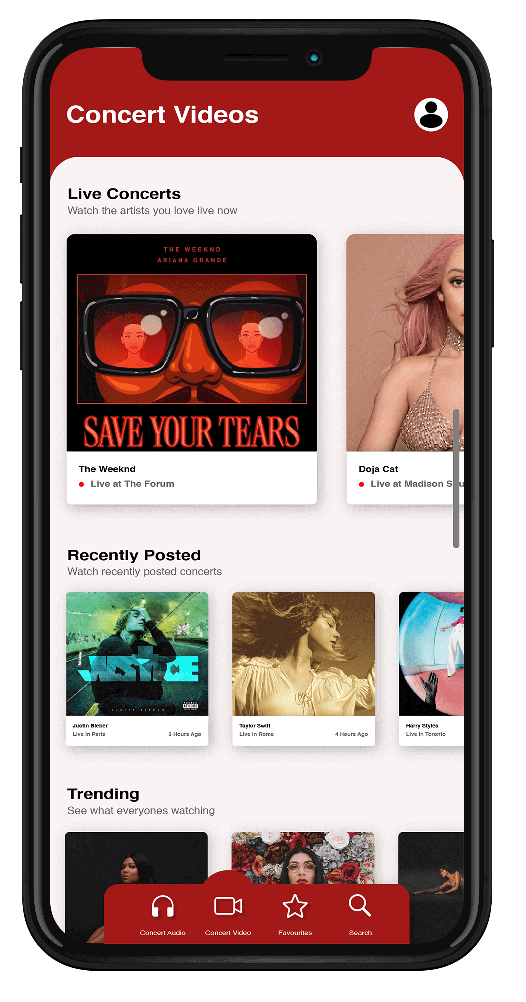
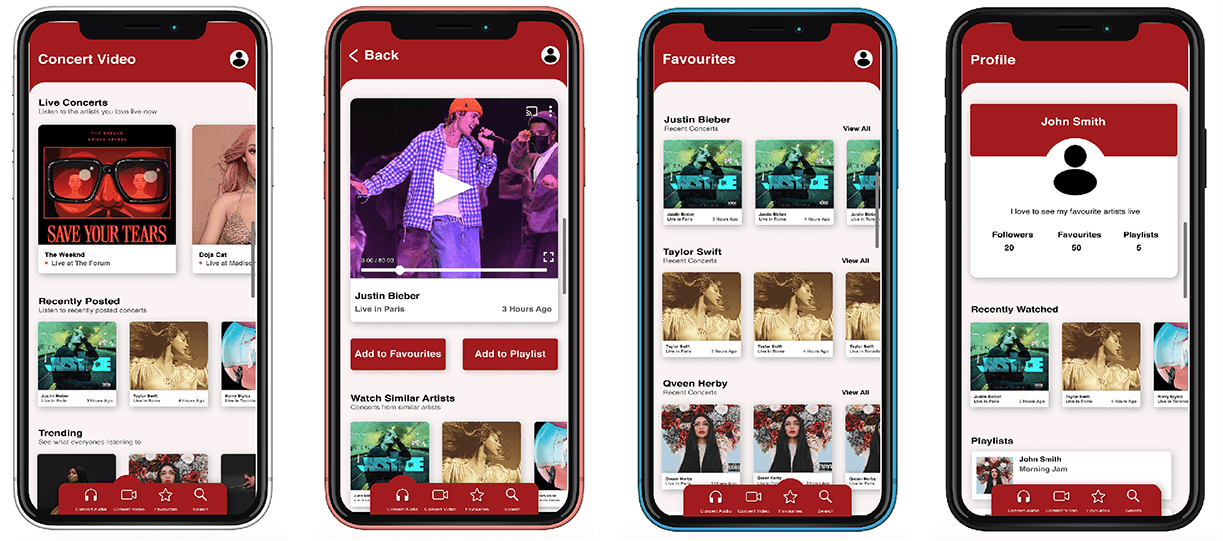
As users initially launch our application, they will be greeted with a curated selection of recommended live shows, past experiences and trending content. Upon selecting a show, users can add it to their playlists, subscribe to an artist by adding it to their favourites list, cast the content to their television, or seamlessly transition into virtual reality mode. Furthermore, users have the added functionality of engaging in live commentary. The favourite artist's page displays the latest releases from artists. The user profile houses their comprehensive watch history, organized playlists, and follower count. The main menu allows users to toggle between audio and video content formats. A clickable prototype was developed on Xcode
Fig.4 Final prototype
Reflection
Embarking on this project, I had no previous experience conducting a user testing session. The journey revealed the immense importance of soliciting direct user feedback at every stage of the design process. However, my team and I encountered unforeseen challenges during this process. One of the main struggles was eliciting candid feedback from our participants. Given that many of these participants were friends and classmates, their feedback seemed influenced by a desire to accommodate our expectations. Confronting this challenge highlighted the importance of using participants unconnected to the project or myself to improve the chances of receiving a fair and impartial evaluation.
Conclusion
With Venue, our concert application, brings the live concert experience to music lovers' homes, saving them the hassle and cost of attending physical shows. With Venue, users can enjoy live or archived concerts in both audio and video formats, curate playlists, follow friends, and relive their favourite concerts. It's an innovative solution that puts the concert experience at your fingertips.